



TLDR
Most people are getting mediocre results from AI, not because the tools are bad, but because the prompts are vague. This is a ranked list of 25 prompting techniques that genuinely move the needle on day-to-day productivity, from prompt chaining and mega-prompts at the top to accountability coaching and gap analysis further down. Each one comes with a ready-to-use example prompt. No fluff, no “just be specific” platitudes. These are the techniques that separate people who use AI from people who get real leverage from it.
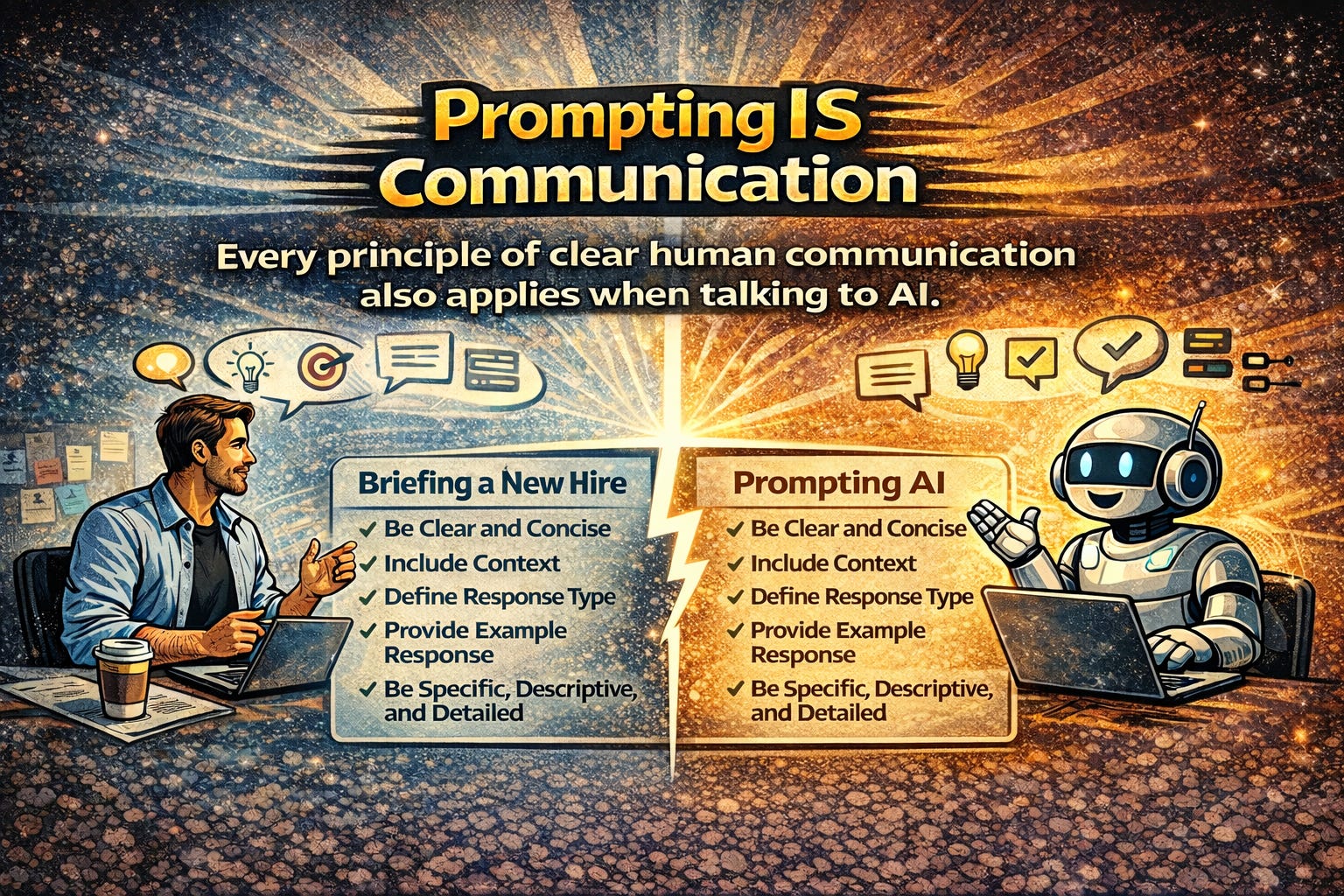
Prompting is How we Communicate with AI
Here’s something that gets overlooked in almost every conversation about AI: prompting isn’t a technical skill. It’s a communication skill.
Think about it. The same things that make you effective in a meeting - being clear about what you want, giving enough context, specifying who you’re talking to, asking good questions before jumping to solutions are exactly what make you effective with AI. Every principle of good human-to-human communication applies to human-to-machine communication. Clarity. Structure. Context. Audience awareness. Specificity. The model doesn’t reward you for being vague, just like your colleagues don’t.
And yet... most of the “prompting advice” out there boils down to “be more specific” or “add context.” Which is a bit like telling someone to “communicate better” in a presentation skills workshop. Technically true. Practically useless.
The reason most people get mediocre results from AI isn’t technology. It’s the same reason most emails get ignored, most briefs get misinterpreted, and most meetings end without clarity - the input wasn’t good enough. The difference is that AI will never push back and say “I don’t understand what you’re asking for.” It’ll just... give you its best guess. And its best guess based on a vague prompt is a vague answer.
So here’s something more useful than “be specific”: 25 prompting techniques, ranked by impact, each with a concrete example you can steal, adapt, and use today. These work across ChatGPT, Claude, Gemini - whatever you’re using. The principles are universal because they’re not really about AI at all. They’re about communication. The AI part is just the medium.
25 Hacks
1. The Prompt Chain
Impact: Transformative
This is the single biggest unlock for most people. Instead of cramming everything into one enormous prompt and hoping for the best, you break the work into a sequence, where each output feeds the next.
Think of it like cooking. You wouldn’t throw every ingredient into a pot simultaneously and expect a Michelin-star meal. You prep, you layer, you build. Same thing here.
Most people overload a single prompt and get mediocre results. Chaining gets you compound quality.
Example (Step 1 of 3):
“Analyse this raw customer feedback data and identify the top 5 recurring themes. For each theme, note frequency and sentiment. Output as a numbered list.”
Then follow with:
“Take theme #1 from your analysis and draft a detailed action plan with owner, timeline, and success metric.”
Then:
“Convert that action plan into a one-page executive summary suitable for a board slide.”
Three prompts. Three minutes. Output that would have taken an afternoon.
2. The Mega-Prompt
Impact: Transformative
The opposite of chaining — and equally powerful in the right context. Here, you front-load everything into one structured request: role, context, task, constraints, format, examples. All of it.
This works best when you want a single comprehensive output and you already know exactly what “good” looks like. It’s also ideal for building reusable templates. Write the mega-prompt once, swap out the variables, and run it every week.
Example:
“You are a senior content strategist at a B2B SaaS company. I need a 90-day content calendar for our blog. Context: We sell project management software to mid-market teams. Our three content pillars are remote work productivity, agile methodology, and team collaboration. Constraints: 3 posts per week, mix of how-to guides, thought leadership, and case study roundups. Format: Table with columns for Week, Title, Pillar, Target Keyword, CTA, and Distribution Channel. Tone: Authoritative but approachable. Avoid jargon.”
One prompt. One shot. A deliverable you can actually hand to someone.
3. Role Assignment with Specificity
Impact: High
“Act as a marketing expert” does almost nothing. The research actually backs this up - vague personas barely shift output quality. But detailed, domain-specific ones? Different story entirely.
The trick is specificity. Don’t just assign a job title. Assign years of experience, industry context, methodology, and crucially, the audience the persona is speaking to. The more precise the identity, the more the model narrows its enormous probability space into something genuinely useful.
Example:
“You are a CFO with 15 years of experience in private equity-backed SaaS companies. You specialise in unit economics and have presented to institutional LPs. Review the following P&L and identify the three metrics a prospective investor would scrutinise first. Explain your reasoning as if briefing your CEO before a board meeting.”
The difference between “act as a finance expert” and the above is the difference between a Wikipedia summary and actual advice.
4. Chain-of-Thought Reasoning
Impact: High
Five extra words. Massive difference in output quality.
Adding “think step by step” — or any instruction that forces the model to show its reasoning before giving an answer — dramatically improves accuracy on anything involving logic, analysis, or multi-step decisions. This is one of the most well-researched techniques in prompt engineering, and it works across every major model.
Example:
“A client has a marketing budget of £50,000 per quarter. They want to allocate across paid search, paid social, and content marketing to maximise qualified leads for a B2B event services company. Think step by step: first analyse the typical cost-per-lead for each channel in this industry, then recommend an allocation with rationale, then identify the biggest risk in your recommendation.”
You’re not just getting an answer anymore. You’re getting the reasoning, which means you can spot where the logic is weak and course-correct.
5. The “Before You Answer” Constraint
Impact: High
This one hack eliminates the most common prompting failure: insufficient context.
Instead of accepting whatever the AI generates on the first pass, you instruct it to ask you questions before responding. It flips the dynamic from vending machine to consultant. And it surfaces context you didn’t even realise you were withholding.
Example:
“I need help writing a proposal for a new client. Before you draft anything, ask me up to 5 questions that will help you write a proposal that sounds like it came from someone who deeply understands their business.”
Suddenly you’re in a dialogue, not a monologue. The output quality jumps because the input quality jumped first.
6. Output Format Specification
Impact: High
This is absurdly simple and absurdly underused. Just... tell the AI what shape the answer should take. Table. Email. Slack message. Executive summary. Numbered list. JSON. Whatever.
Most people describe what they want but forget to describe how they want it delivered. The format specification alone can turn a rambling paragraph into something you paste directly into your workflow.
Example:
“Compare the pros and cons of Notion, Monday.com, and Asana for a 30-person marketing agency. Format your answer as a comparison table with rows for: Pricing, Ease of onboarding, Client collaboration features, Reporting, Integrations, and Best suited for. Add a one-sentence verdict at the bottom.”
Same information. Completely different usability.
7. Few-Shot Prompting
Impact: High
Showing is better than telling. Always has been and that applies to AI too.
Providing one or two examples of what “good” looks like is far more effective than describing it in abstract terms. This is especially powerful for writing tasks where tone, style, and structure matter. You’re essentially saying “do more like this” instead of hoping the model interprets your adjectives correctly.
Example:
“Write me LinkedIn post hooks for our new AI event activation product. Match the style of these examples:
Example 1: ‘We gave 500 conference attendees a camera, an AI model, and 30 seconds. What happened next changed how we think about live events.’
Example 2: ‘Your attendees are already bored of photo booths. Here’s what comes next.’
Now write 5 more hooks in this style for a product that turns selfies into AI-animated dancing videos at live events.”
You went from “write something catchy” to “write something that sounds like us.” Night and day.
8. The Iterative Refinement Loop
Impact: High
Here’s the uncomfortable truth: the first output is almost never the best output. But most people accept it and move on.
Power users treat the first response as a draft — a starting point, not a deliverable. They refine through follow-up prompts, just like an editor would mark up a first draft. This mimics the creative process that produces good work in any medium: write, review, revise, repeat.
Example (after receiving a first draft):
“Good start. Now revise with these changes: (1) Make the opening paragraph more direct — cut the throat-clearing. (2) Add a specific data point to support the second argument. (3) Tighten the conclusion to a single sentence call to action. (4) Reduce overall length by 30%.”
The prompt took 20 seconds to write. The improvement in output quality? Significant.
9. Audience Specification
Impact: High
The same topic explained to a C-suite executive, a junior developer, and a non-technical client requires completely different language, depth, and framing. But if you don’t tell the AI who the reader is… it defaults to writing for no one in particular. Which is exactly what it sounds like.
Example:
“Explain what retrieval-augmented generation (RAG) is and why it matters for enterprise AI. Write this for a non-technical marketing director who needs to brief their CEO. Avoid acronyms. Use a business analogy to make the concept click. Keep it under 200 words.”
Same topic. Radically different output. All because you told it to who’s reading.
10. The Reverse Prompt
Impact: High
When you don’t know how to frame a complex task, which, let’s be honest, happens more often than anyone admits, ask the AI to write the prompt for you.
This is a meta-hack. It teaches you better prompting while immediately improving your results. And it’s surprisingly effective because the model understands its own processing patterns better than you do.
Example:
“I want to use AI to help me prepare for a difficult salary negotiation with my manager. What would be the ideal prompt I should give you to get the most useful coaching? Write the prompt for me, then I’ll paste it back to you.”
Think of it as asking the chef what to order. They know the kitchen better than you do.
11. Constraint Injection
Impact: Medium-High
This one’s counterintuitive: more constraints usually produce better results. Word limits, forbidden words, required inclusions, structural rules. They all force the model to work harder and be more deliberate about its choices.
It’s the creative brief principle. “Write me something” is paralysing. “Write me 100 words, no jargon, ending with a question” is liberating.
Example:
“Write a cold outreach email to the VP of Marketing at a mid-size events company. Constraints: Maximum 100 words. No more than 3 sentences per paragraph. Must include one specific observation about their company. Must end with a single, low-friction call to action. Do not use the words ‘synergy,’ ‘leverage,’ or ‘circle back.’”
The constraints don’t limit the output. They focus on it.
12. The “Critique Then Improve” Loop
Impact: Medium-High
Ask the AI to critique its own work, then revise based on its own feedback. Two steps, one conversation, and you get something markedly better than the first pass.
This simulates having a second pair of eyes on your work, except the second pair of eyes is available instantly, at no cost, at 11pm on a Sunday.
Example (after receiving an output):
“Now critique your response as if you were a senior editor. Identify the three weakest points, any unsupported claims, and any sections where the reader might lose interest. Then produce a revised version that addresses every issue you flagged.”
It’s remarkable how good AI is at spotting flaws in its own work when you simply... ask it to look.
13. The RTFD Framework
Impact: Medium-High
If you remember nothing else from this article, remember RTFD: Role, Task, Format, Details. It’s a reliable scaffolding for any business prompt and ensures you never forget the key ingredients.
Not every prompt needs to be a work of art. Sometimes you just need a formula that works consistently.
Example:
“Role: You are a senior HR business partner. Task: Draft an internal announcement about our company’s new flexible working policy. Format: Email, under 250 words, with a subject line. Details: The policy starts 1 May. Employees can work from home up to 3 days per week. It applies to all UK-based staff. Tone should be warm but clear on expectations.”
Four components. Reliable output. Every time.
14. Conditional Logic Prompting
Impact: Medium-High
Give the AI decision rules to follow, and its output adapts based on what it receives. This is where prompting starts to feel less like chatting and more like programming — in the best way.
Especially useful for repeatable processes like lead qualification, support triage, or content categorisation.
Example:
“I’m going to paste customer support tickets one at a time. For each ticket, classify it as Billing, Technical, or Feature Request. If Billing: draft a 2-sentence response with a link to our payment FAQ. If Technical: ask one clarifying question before suggesting a fix. If Feature Request: log it in a table with columns for Date, Feature Description, and Customer Tier.”
You’ve just built a basic AI workflow. No code, no automation platform, just a well-structured prompt.
15. The “Explain My Options” Prompt
Impact: Medium
Instead of asking AI to make a decision for you — which it shouldn’t, and you probably shouldn’t let it. Ask it to lay out your options with tradeoffs. You keep the judgment. It does the analysis.
Example:
“I need to choose a CRM for a 30-person agency. My shortlist is HubSpot, Salesforce, and Pipedrive. For each, give me: (1) The strongest argument for choosing it, (2) The biggest risk or downside, (3) The type of company it’s best suited for, (4) Estimated total cost for 30 users per year. Then tell me which questions I should be asking myself to make this decision.”
Notice the last line. You’re not asking it to choose. You’re asking it to help you choose better.
16. Persona Flipping
Impact: Medium
Ask the AI to answer the same question from two or more opposing viewpoints. Excellent for stress-testing strategies, preparing for pushback, or finding the holes in your own thinking.
It’s essentially a debate simulation, except both debaters are available on demand and neither gets offended.
Example:
“I want to pitch my CEO on investing £100,000 in AI tooling for the agency this year. First, write the strongest case FOR the investment as if you are the VP of Technology. Then write the strongest case AGAINST it as if you are the CFO who is sceptical of unproven ROI. Then suggest how the VP should address the CFO’s objections.”
Three perspectives. One prompt. Much better preparation than rehearsing your pitch alone in the shower.
17. The “Teach Me Like I Am” Prompt
Impact: Medium
Specify your current knowledge level and the AI calibrates its explanation accordingly. This eliminates the too-basic or too-advanced problem that makes most AI explanations feel either patronising or bewildering.
Example:
“I understand basic SEO - keywords, meta descriptions, internal linking, but I’ve never worked with structured data or schema markup. Explain schema markup to me as a natural next step from what I already know. Include one practical example I could implement on a WordPress site today.”
You’re not starting from zero. You’re not pretending to be an expert. You’re telling the AI exactly where you are so it meets you there.
18. Summarise Then Extract
Impact: Medium
When dealing with long documents, meeting transcripts, or data dumps, a two-phase approach beats a one-shot request every time. First: summarise. Then: extract specific action items or insights.
This prevents the AI from drowning in detail and gives you both the forest and the trees.
Example:
“Here is the transcript of our 60-minute strategy meeting. First, provide a 5-sentence summary of the key discussion points. Then extract: (1) All decisions that were made, (2) All action items with the person responsible and deadline, (3) Any unresolved questions that need follow-up.”
Sixty minutes of conversation, distilled in under a minute. That’s the promise of AI productivity — when the prompt is right.
19. Template Generation
Impact: Medium
Instead of writing one-off prompts, ask the AI to create reusable templates with placeholder fields you can fill in repeatedly. This turns a single prompting session into a long-term productivity system.
One good template, reused 50 times? That’s 50 tasks where you didn’t have to think about the prompt at all.
Example:
“Create a reusable prompt template I can use every Friday to generate a weekly client report. The template should have placeholder fields I can fill in for: project name, key accomplishments this week, blockers, next week’s priorities, and budget status. The output should be a professional email I can send directly to the client.”
Build the template once. Use it forever. That’s leverage.
20. The Rubber Duck Prompt
Impact: Medium
Named after the old programming trick of explaining your code to a rubber duck to find bugs — except this duck talks back and asks good questions.
Use the AI as a sounding board for half-formed ideas. Describe your messy, unfinished thinking and ask it to help you organise, challenge, or build on it. This replaces the “I just need to talk this through with someone” moment, which usually requires finding a willing colleague and an empty meeting room.
Example:
“I’m thinking about pivoting our agency’s positioning from ‘full-service digital marketing’ to ‘AI-powered event marketing.’ I haven’t fully thought this through yet. Here’s what’s in my head: [paste your rough notes]. Help me organise these thoughts into a coherent argument. Challenge any assumptions that seem weak. Then suggest the three things I should validate before making this decision.”
Half-baked idea in. Structured thinking out.
21. The Pre-Mortem
Impact: Medium
Before launching anything, ask the AI to imagine it’s already failed and then work backwards to identify why. This is a well-known strategic exercise, and AI is exceptionally good at it because it has no optimism bias.
Example:
“We’re about to launch a new AI chatbot product for live events. Imagine it’s 6 months from now and the launch has failed. Write a post-mortem analysis identifying the 5 most likely reasons it didn’t succeed. For each reason, suggest one preventive action we could take now.”
Your team will thank you for catching the blind spots before they became expensive lessons.
22. The Tone Transplant
Impact: Medium
Describing a tone in the abstract — “professional but friendly” — is remarkably imprecise. Instead, paste a sample of the writing style you want to match and ask the AI to analyse it before writing in that voice.
Example:
“Here’s a sample of our founder’s writing style from a recent LinkedIn post: [paste sample]. Analyse the key characteristics of this writing: sentence length, vocabulary level, use of stories, rhetorical devices, and overall tone. Then write a new 300-word LinkedIn post about AI at live events in exactly this style.”
You’ve gone from “sound like us” which means nothing to an AI to “here’s precisely what ‘us’ sounds like.”
23. Data Structuring
Impact: Medium
Paste unstructured data, messy notes, or raw exports and ask the AI to clean and restructure them. This is one of those tasks that takes humans an unreasonable amount of time and takes AI... seconds.
Example:
“Below is a raw export of 50 leads from our event last week. The data is messy - inconsistent formatting, missing fields, names in various cases. Clean this data into a structured table with columns for: Full Name (title case), Email, Company, Job Title, and Lead Score (assign Hot/Warm/Cold based on job title seniority). Flag any rows with missing critical data.”
Hours of spreadsheet work. One prompt. Done.
24. The “What Am I Missing” Prompt
Impact: Medium
After completing your own work, paste it in and ask the AI to find the gaps. This is a fast, free second opinion on any plan, document, or strategy — and it catches things your brain glosses over because it already knows what it intended to write.
Example:
“Here’s my marketing plan for Q3. Review it and tell me: (1) What important elements am I missing? (2) What assumptions am I making that I should test? (3) What would a competitor do to undercut this plan? (4) What’s the single biggest risk I haven’t accounted for?”
Not “is this good?” — that’s a useless question. “What did I miss?” — that’s the one that improves your work.
25. The Accountability Prompt
Impact: Situational but Powerful
Use the AI to create structure and accountability around your goals. This turns a chat interface into a lightweight coaching and project management tool, especially useful for solo operators or anyone who doesn’t have a team looking over their shoulder.
Example:
“I want to publish 12 LinkedIn posts this month to build my personal brand around AI in events marketing. Act as my content accountability coach. First, create a 4-week posting schedule (3 per week) with suggested topic angles. Then, every time I return to this conversation, ask me which posts I’ve completed, give me feedback on what I share, and suggest improvements for the next batch.”
It’s not going to replace a real coach. But it’s available at 6am and it never cancels on you.
Final Words
Here’s the thing about all 25 of these techniques: not a single one requires any technical skill. No coding. No API access. No special tools. Just a better understanding of how to communicate with intention — which, if you think about it, is the same skill that makes people effective in every other professional context.
We’ve spent decades refining how we communicate with other humans. How to write a clear brief. How to give feedback that actually lands. How to run a meeting that ends with decisions instead of confusion. How to ask questions that surface the real problem instead of the surface-level symptom. Prompting is just that — applied to a different kind of collaborator.
The gap between “AI is useless” and “AI is transformative” is almost always a communication gap. The people getting extraordinary results aren’t using a different tool. They’re using the same tool with more intentional input. They’re doing what good communicators have always done: being clear about what they want, providing the context someone needs to help them, and iterating instead of hoping the first attempt is perfect.
And if this list feels overwhelming, don’t try to master all 25 at once. Pick three. The Prompt Chain (#1), the “Before You Answer” Constraint (#5), and the Critique Then Improve Loop (#12) would be a strong starting trio. Get those into your daily workflow. The rest will follow naturally.
The AI doesn’t need to get smarter. The prompts do. And improving your prompts is really just improving how you communicate, which unlike the models themselves, is entirely in your hands.
More prompting resources
Reverse Prompt Engineering Framework (RPEF) - Deliver Consistent Results with LLMs