



On 19 May 2026, I attended online Code with Claude London 2026 - Anthropic’s first developer event outside San Francisco. A full day across a main stage, two breakout tracks, and hands-on workshops, dedicated entirely to Claude for developers: what is shipping, what is coming, and how teams are building on top of it today.
This piece is a complete rundown of every new feature announced at the event - or something you need to be aware of right now. No editorial fluff. Just what shipped, how it works, and why it matters.
I organised everything into three layers: Autonomy (Claude acting without you), Visibility (you seeing what Claude is doing), and Infrastructure (deploying Claude seriously in production).
TL;DR
Claude Code is getting out of your way (Auto Mode, Routines, CI Autofix, Work Trees, Auto Memory)
New ways to see and manage what is running (Agent View, Remote Control, Desktop Refresh, TUI)
Enterprise-grade production infrastructure is now available (Self-Hosted Sandboxes, MCP Tunnels, Claude Security, Advisor Strategy, Tool Search, Compaction, Prompt Caching, Programmatic Tool Calling
The Autonomy Layer
The biggest theme of the day was not a single feature. It was a direction: Claude should interrupt you less. Every feature here serves that idea.
Auto Mode
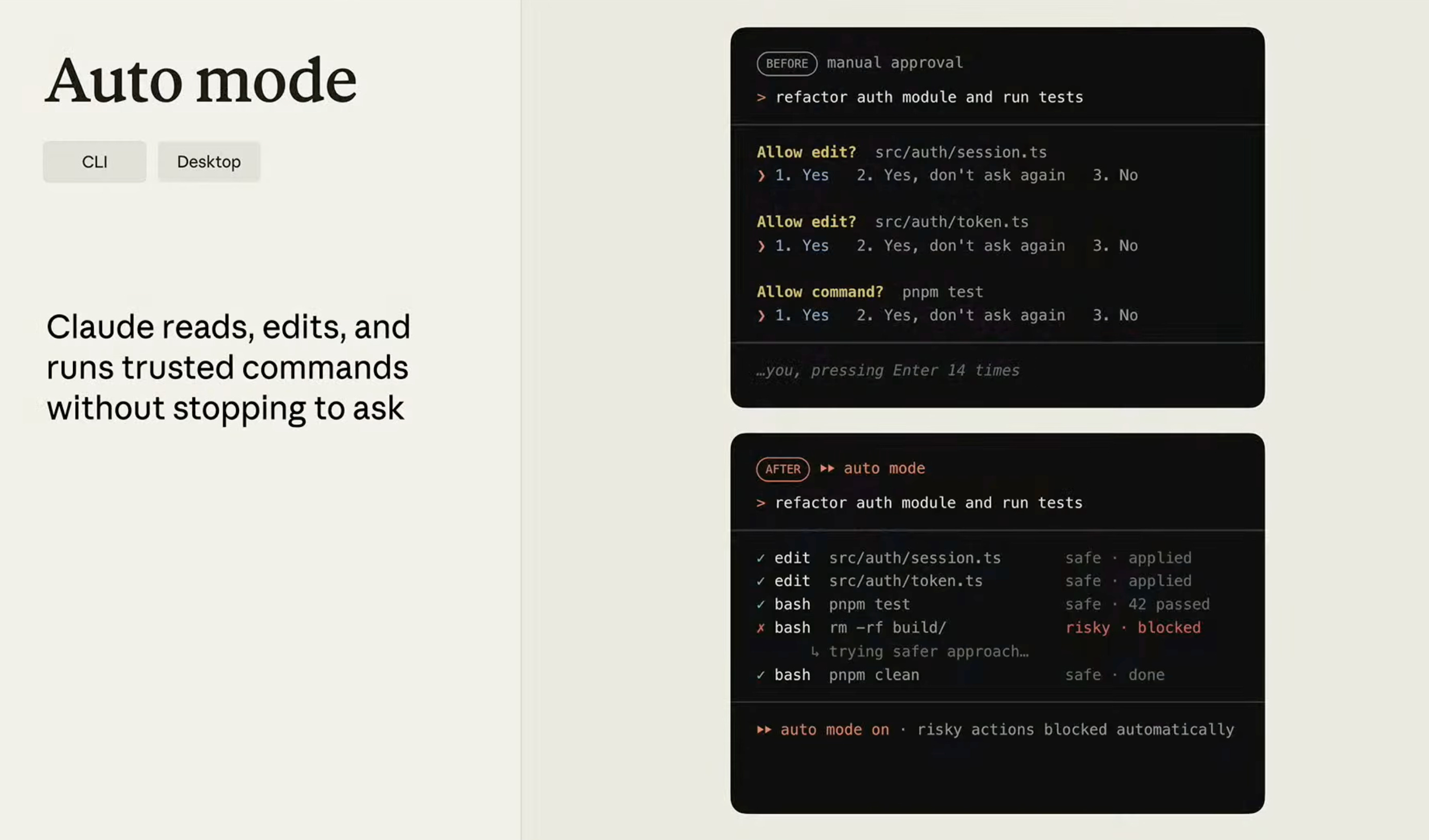
Previously, Claude Code would stop and ask for permission every time it wanted to read a file, access a folder, or run a command. That behaviour made sense when models were less capable. It creates friction now.
Auto Mode removes most of those stops. When Claude needs to take an action, it runs a two-stage internal check first. Is this destructive? Does this look like a prompt injection attempt? If both checks pass, Claude acts and keeps going. If either fails, it looks for a safer path - or, only then, asks you.
The result in practice: you dispatch a task, step away, come back to results. Not a faster model. A better loop.
Routines
Probably the most significant developer experience change shipped this year. Released in research preview earlier in May.
The idea: Claude Code sessions no longer require a human to start them. You configure a trigger - a scheduled time, a GitHub webhook, an API call from an external system - and Claude executes automatically on remote compute. Your laptop does not need to be open.
In the demo, one routine ran a code review every time a GitHub issue was opened and posted a structured response directly back to the issue. Another reviewed every pull request and added review comments to the PR. Neither required a human to type a single prompt.
Boris Cherny described Routines as “a higher-order prompt.” You write the automation. Claude does the prompting. For anyone building async-first, this changes the default question from “when do I prompt Claude?” to “what should Claude be running while I am doing something else?”
CI Autofix
A direct extension of Routines. CI Autofix watches an open PR from the moment it is created until it merges. It handles code review comments, security flags, merge conflicts, and flaky CI failures automatically.
In the live demo, a network timeout caused CI to fail. Autofix diagnosed it as a known infrastructure issue and retried the job. The engineer who opened the PR never saw the red X. Anthropic’s internal teams have configured it to fix root causes rather than just retry - a distinction that matters at scale.
Work Trees (native support)
Work Trees already existed, but managing them manually was error-prone and they fell away between sessions. Now they are native.
If you run multiple Claude Code sessions on the same repository - which most serious users do - each session now gets its own isolated copy of the project in a subdirectory. No agents overwriting each other’s file edits. You start a session with claude --work-tree and Claude handles the rest. The Desktop app exposes this as a checkbox on session creation.
Auto Memory
Every time you start a new Claude Code session, Claude starts fresh. You re-explain your preferences, debugging patterns, architectural choices. Your CLAUDE.md file helps, but it does not capture what you learn while actually doing the work.
Auto Memory fixes this. During sessions, Claude silently takes notes - coding style, architectural decisions, project-specific patterns - and saves them to a local memory.md file. The file never leaves your machine and is never pushed to GitHub. It is indexed rather than monolithic, so Claude uses progressive discovery to load only relevant memories rather than dumping everything into context at once.
The clearest way to think about it: CLAUDE.md is the onboarding document you hand Claude on day one. memory.md is the notebook Claude keeps while doing the actual work.
The Visibility Layer
Parallel agents and long-running tasks create a new problem: how do you know what is actually running? Four features address this.
Agent View (CLI)
A new top-level view in the Claude Code CLI. One screen. Every session status at a glance - running, waiting for input, complete. You can dispatch prompts to individual sessions without entering them. Sessions run in the background regardless.
Released in public preview at the event. If you regularly run several Claude sessions at once - what the Anthropic team has started calling “multi-Cloding” - this is the feature you did not know you needed until the terminal chaos got bad enough.
Remote Control
Not brand new, but highlighted heavily because audience polling showed almost no one in the room was using it. Remote Control lets you start a Claude Code session on your machine and control it from the Claude mobile app or any browser. You receive push notifications when Claude needs input and can respond inline from your phone.
Practical setup note from the demo: add remoteControl: always to your settings.json so every session is automatically accessible. You never know when you will need to respond to a prompt from somewhere other than your desk.
Desktop App - Full Rebuild
The Desktop app has been rebuilt from the ground up. Sessions are now grouped by GitHub repo so parallel sessions are navigable. You can view the plan Claude generated for any past conversation. You can leave inline comments on plans and code diffs - those comments are sent back to Claude as instructions. Native GitHub integration shows diffs and file trees without leaving the app.
The team acknowledged that many CLI users had dismissed earlier versions of the Desktop app. They explicitly invited them back. Worth a second look if you wrote it off before.
Flickering-Free Terminal (Full Screen TUI)
A narrow fix, but one that many people have been quietly waiting for. Long Claude Code sessions caused visible flickering in the terminal because every new output triggered a full repaint of the scrollback buffer.
The new full-screen mode (/tui fullscreen) virtualises the entire scrollback. Only what is on screen gets rendered. Memory stays flat across very long sessions. It also enables clickable elements inside the terminal: collapsible output blocks, a jump-to-bottom button, interactive controls that were not possible before. The kind of fix that makes a tool you use for eight hours a day noticeably better.
The Infrastructure Layer
This section covers the features that make Claude viable for serious production deployments: compute control, secure connectivity, cost optimisation, and security.
Self-Hosted Sandboxes
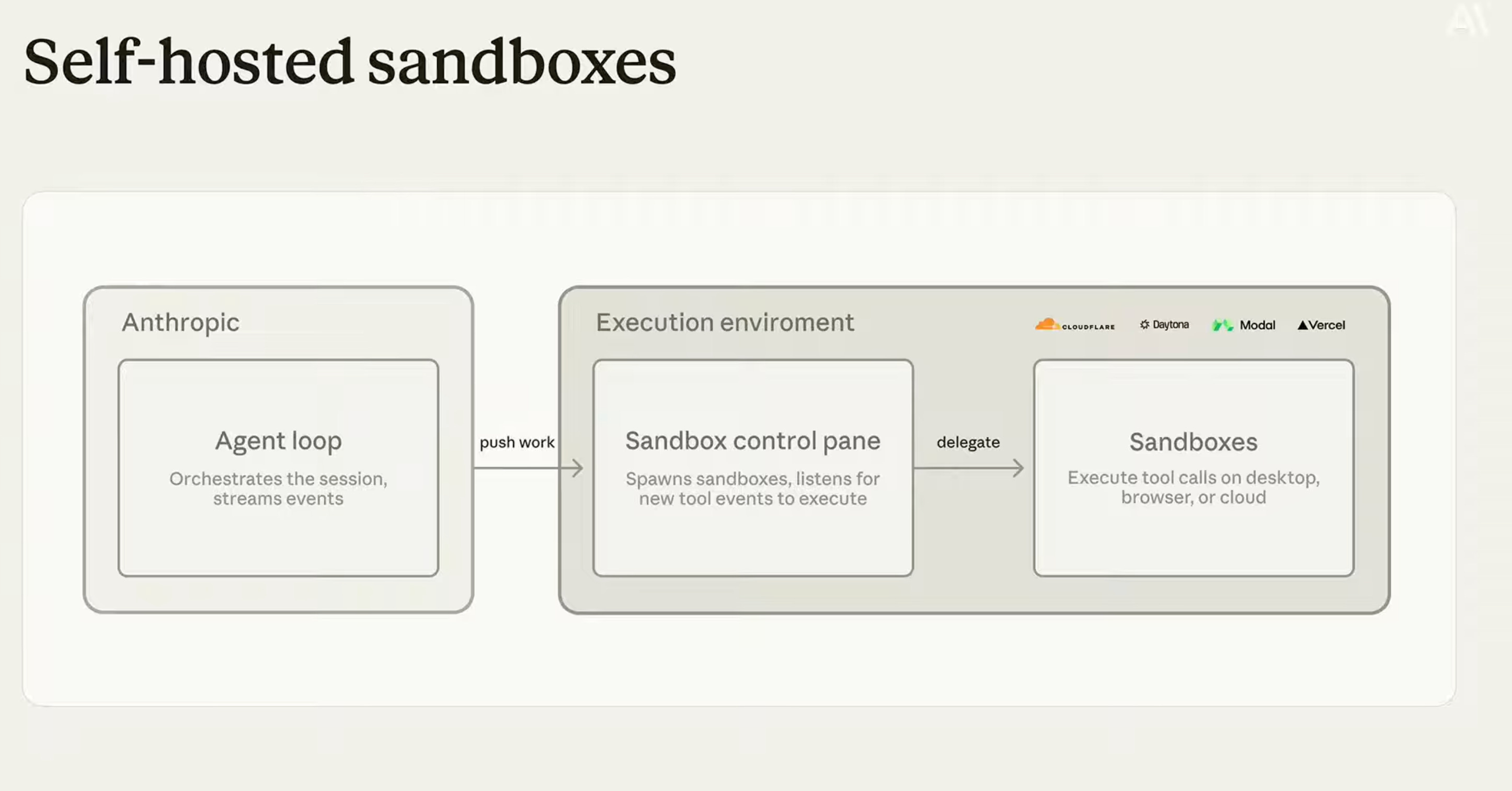
Until now, when a Claude Managed Agent needed to write or execute code, it did so in Anthropic’s own sandboxes. Starting from this event, you can bring your own compute.
Here is how it works. When the agent needs to execute, it places a work item in a queue. Your infrastructure picks that up, spins up a sandbox inside your own environment, runs the work, and returns the result. You control the network policies, audit logs, and when sandboxes spin up and idle. Anthropic just sends the signal that a new sandbox is needed.
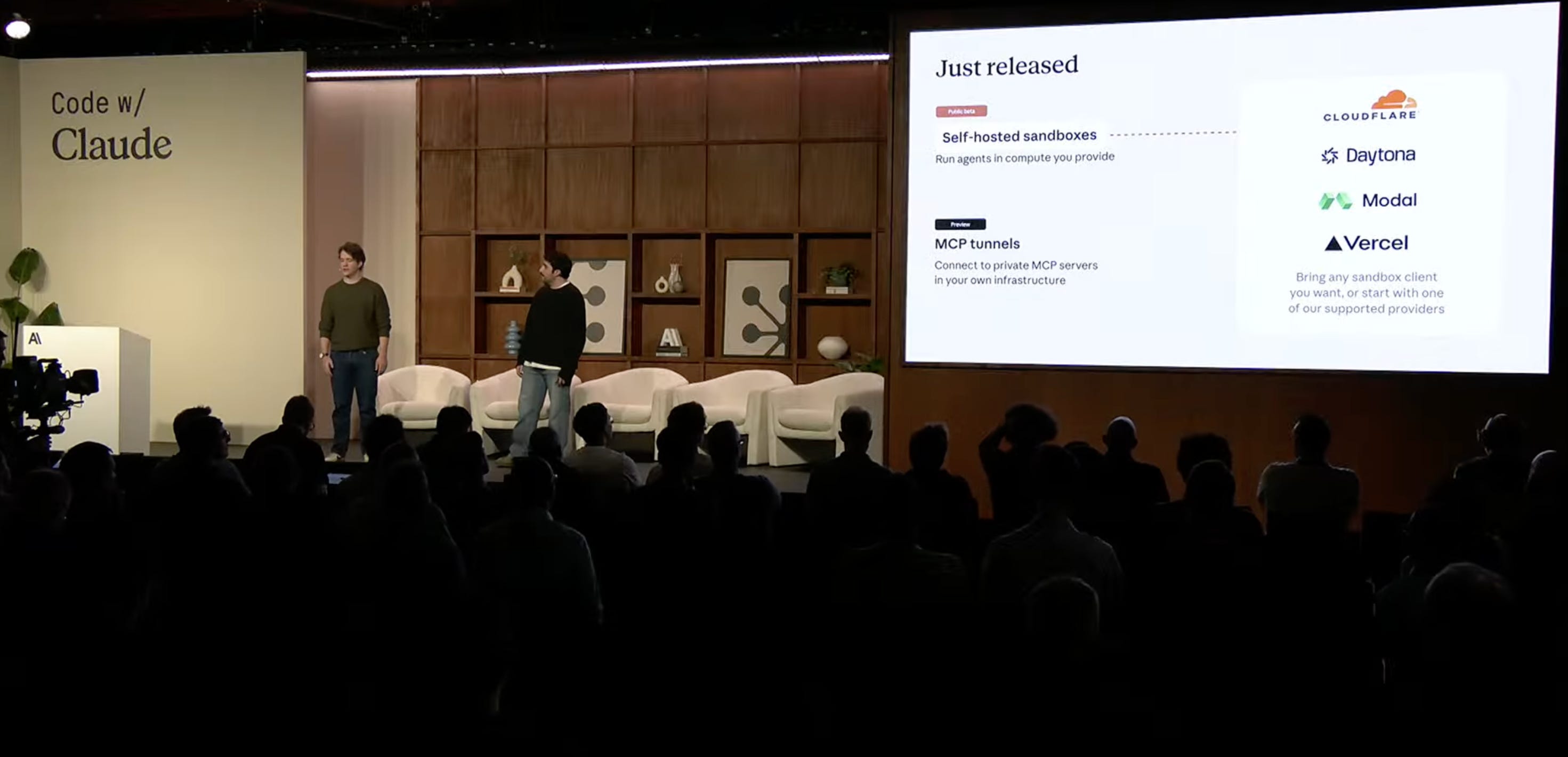
First-class support was announced for four providers at launch: Cloudflare, Daytona, Modal, and Vercel. Integration is a few lines of configuration with any of them.
For teams with compliance requirements, or teams that cannot let code execution leave their VPC, this is probably what was blocking Claude Managed Agents from being a viable option. That blocker is now gone.
MCP Tunnels (Research Preview)
MCP Tunnels let Claude Managed Agents access private MCP servers - tools hosted behind your company’s firewall - without exposing them over the public internet.
The setup: you run a lightweight proxy inside your private network that establishes a secure tunnel to Anthropic. Agents can then call your internal data warehouse, feature flag service, or any other internal tool as if it were a standard MCP server. No VPN required. No complex network configuration. No public exposure.
In the demo, a Slack-based growth agent was querying an internal data warehouse and calling an internal feature flag service - both behind the firewall, both accessed via tunnel. Neither service touched the public internet at any point.
Claude Security
A new dedicated product. Claude Security scans your entire codebase overnight, surfaces vulnerabilities ranked by severity, and creates a direct path to kick off a Claude Code session to address each one.
The context matters. Teams shipping at AI speed are generating more PRs than most security teams can manually review. Claude Security closes that gap - finding the vulnerabilities and providing an integrated path to fix them with the same tooling that helped write the code.
Advisor Strategy
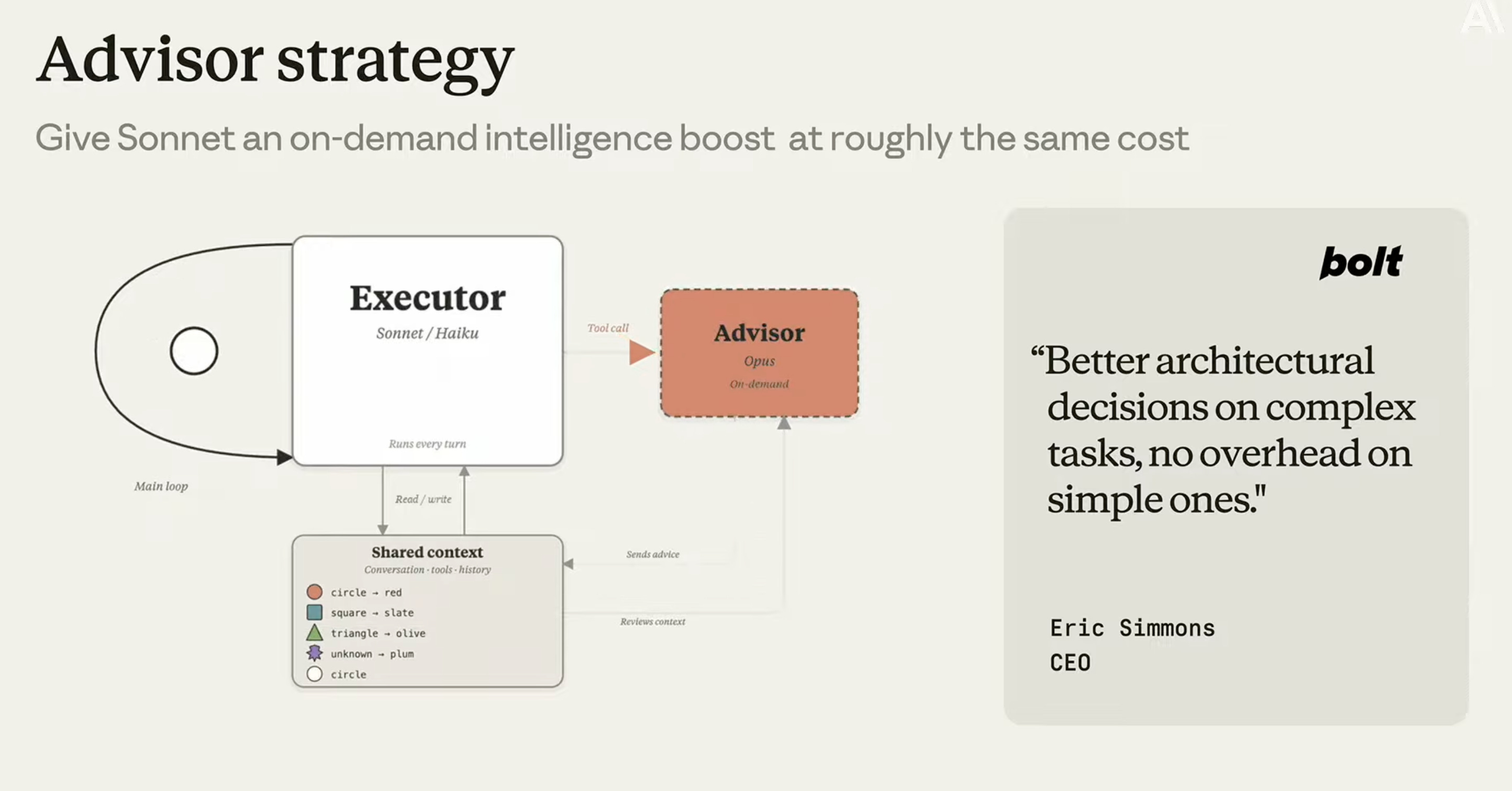
A new API primitive for cost optimization without sacrificing output quality.
The idea: pair a smaller executor model - Haiku or Sonnet - with a larger advisor model, Opus, that activates only when the executor needs help. The smaller model handles the bulk of work at a fraction of the cost. When it hits something genuinely complex, it calls the advisor.
Eve Legal reported getting frontier-model quality at five times lower cost using this pattern. In the conference demo, Sonnet flagged a contract renewal as low risk. Opus, when consulted, noticed that a specific person the client required was unavailable on the event date - making the deal actually at risk. Sonnet alone would have missed it. Opus alone for every turn would have cost significantly more.
Tool Search
Instead of loading every available tool schema into the model’s context on every turn, Tool Search lets agents dynamically retrieve only the tool relevant to the current step. A lightweight meta-tool describes what is available. Claude queries it to identify what it needs, then fetches just that schema.
Lovable reported a 10% reduction in total token consumption after rolling this out - and improved model performance alongside it. Less irrelevant context means better signal on the actual task.
Programmatic Tool Calling
When a tool returns a large result, you probably do not need all of it in context. Programmatic Tool Calling has Claude write a short script to call the tool, extract only the relevant portion, and stream just that back into context.
In the demo, a sales-call recording tool was returning full 60-minute transcripts. Claude wrote a loop to extract aggregate sentiment only. What was previously a massive result block became a handful of relevant lines. Performance improved. Cost dropped.
Compaction
For long-running sessions that approach context limits, Compaction allows the conversation to continue rather than hitting a hard stop. You set a threshold - 400k tokens is the suggested starting point. When the session approaches it, Compaction summarises the conversation using a prompt you define, removes terms no longer relevant, and resets the window. The conversation continues.
The practical outcome: agents can work for hours, or across multi-day tasks, without the session dying at a context wall.
Automatic Prompt Caching
Prompt caching has been available for a while, but implementing it required manual configuration of cache breakpoints in API requests. Automatic prompt caching handles this in one line.
Given that caching is probably the single highest-impact cost optimisation for most production agents, removing the setup friction removes the last excuse not to have it in place.
What this signals
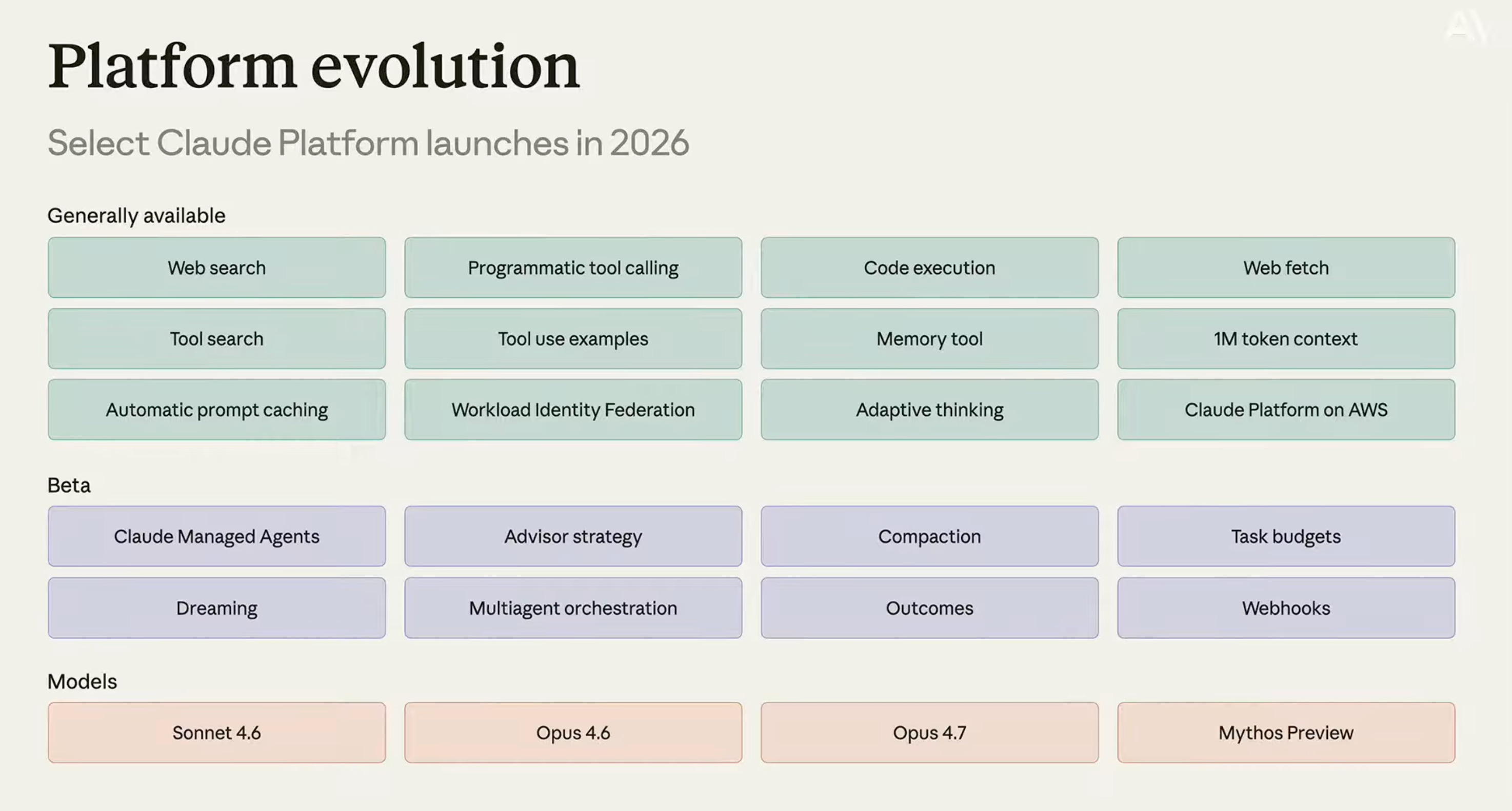
I will save the full strategic take for a separate piece.
But one observation from watching the full day: almost every announcement had the same root logic. Give Claude more autonomy, and give developers better visibility into what that autonomy is doing. Auto Mode, Routines, Work Trees, MCP Tunnels, Self-Hosted Sandboxes - they all answer the same quiet frustration. You are not trying to babysit Claude. You are trying to trust it enough to run.
The infrastructure and cost features are what make the autonomy features believable in production. You do not give an agent more autonomy without knowing it is running in your own environment, on your own compute, at a cost you can actually model.
That is probably the most coherent product story Anthropic has told in a single day. Whether the execution matches the ambition, the next few months will show.
References and resources
Watch the full event recording: Code with Claude London 2026 - YouTube
Event page and full agenda: claude.com/code-with-claude/london